
A smart board is an interactive touch-screen display that combines a digital whiteboard, computer, and presentation screen into a single device. Also called interactive flat panel displays (IFPDs), smart boards use infrared or capacitive touch technology to detect finger and stylus input, allowing users to write, draw, annotate, and control applications directly on screen. The global interactive display market reached $15.2 billion in 2024 and is projected to grow to $52.4 billion by 2030 (Source: Grand View Research, 2024).
Summary: A smart board is an interactive touchscreen display that combines a large-format LCD or LED panel with software for writing, annotation, video conferencing, and screen sharing, replacing traditional whiteboards and projectors. WEFONE LED’s smart boards range from 65 to 98 inches with built-in Android or Windows OPS modules for classrooms, meeting rooms, and training centers. For premium solutions, you can choose the P2.5 indoor LED poster screen.
Next step: compare WEFONE interactive smart boards. WEFONE LED supplies interactive smart boards in 55″, 65″, 75″, 86″ and 98″ sizes with infrared touch, built-in Android or Windows OPS, a 2-year warranty and a quotation returned within 48 hours. See sizes and current pricing on the interactive smart board range — from AED 3,240 per unit. Request a quote or call +971 55 883 6266.
What is Smart Board Used For?
Smart boards are used in education, corporate meetings, training, healthcare, and government facilities as interactive replacements for traditional whiteboards, projectors, and flip charts with a single interactive device. According to Futuresource Consulting (2024), education accounts for 65% of all interactive display shipments globally, followed by corporate (25%) and government/healthcare (10%).
Primary applications include:
- Classrooms: Understanding what is smart board for teaching is simple — it enables interactive lessons, collaborative learning, Google Classroom/Teams integration
- Meeting rooms: Video conferencing, brainstorming, wireless screen sharing from laptops/phones
- Training centers: Employee onboarding, medical education, military briefings
- Retail/hospitality: Digital signage with touch interaction, wayfinding kiosks
- Healthcare: Patient education, surgical planning displays, telehealth stations
How Does a Smart Board Work?
A smart board works by combining an LCD/LED display panel with a touch-sensing overlay and an embedded computer. When you touch the screen, understanding how smart board works is straightforward: the touch layer detects the position of your finger or stylus and sends coordinates to the built-in processor, which translates the input into actions — drawing lines, opening apps, or navigating content.
Core Components
| Component | Function | Technology |
|---|---|---|
| Display Panel | Shows the visual output | LED-backlit LCD, 4K UHD (3840×2160) |
| Touch Layer | Detects finger/stylus position | Infrared (IR) array — 20+ touch points |
| Embedded Computer | Runs OS and applications | ARM processor with Android 13 OS |
| OPS Slot (optional) | Runs Windows PC inside the board | Intel i5/i7, 8-16GB RAM, SSD |
| Speakers | Built-in audio output | 2×15W stereo speakers |
| Camera (optional) | Video conferencing | 8MP wide-angle, 120° FOV |
| Connectivity | Input/output ports | HDMI×3, USB-C, USB 3.0×4, LAN, WiFi 6 |
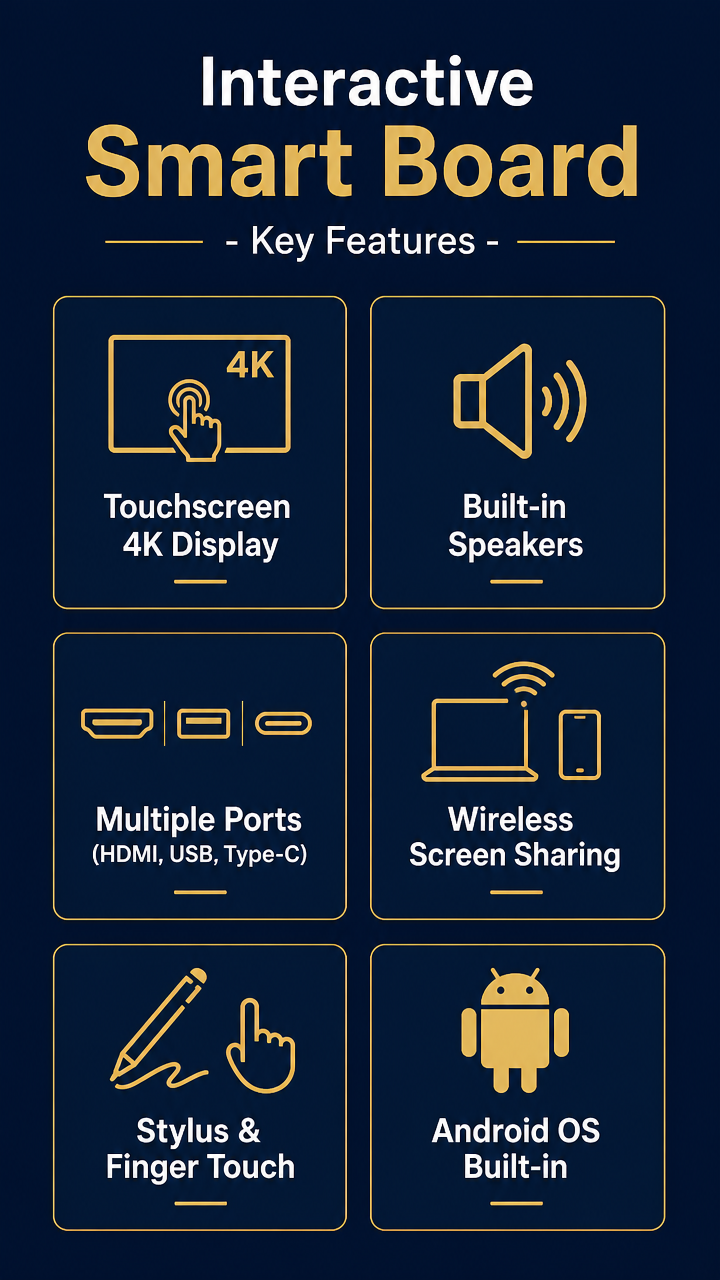
How Touch Detection Works
Most modern smart boards use infrared (IR) touch technology: an array of IR LEDs and sensors along the screen edges create an invisible grid of light beams. When a finger or stylus breaks these beams, the system triangulates the exact touch position within 2-8 milliseconds. This enables:
- 20-40 simultaneous touch points (multiple users can write at once)
- Palm rejection (rests hand on screen without triggering input)
- Pressure sensitivity with compatible styluses
- Object recognition (some models distinguish pen, finger, and eraser)
When Were Smart Boards Introduced?
When did smart boards come out? The first smart board was introduced in 1991 by SMART Technologies, a Canadian company founded by David Martin and Nancy Knowlton. The original SMART Board was a rear-projection interactive whiteboard that connected to a computer and projector — users could control the computer by touching the board’s surface.
For a full timeline from that first rear-projection board to today’s AI-integrated classroom displays, read our breakdown of smart board evolution and its educational impact.
Smart Board Timeline
| Year | Milestone | Significance |
|---|---|---|
| 1991 | SMART Board invented | First commercial interactive whiteboard; used rear-projection + resistive touch |
| 1992 | First education deployment | Installed in classrooms in Alberta, Canada |
| 2003 | UK government initiative | £50M investment put IWBs in every UK classroom; global adoption accelerated |
| 2004 | SMART reaches 500,000 units | Became the world’s largest IWB manufacturer |
| 2010 | Foxconn acquires SMART | Manufacturing scaled globally; prices dropped 30-40% |
| 2013 | First flat-panel IFPDs appear | LED displays replaced projector-based systems; eliminated bulb replacement |
| 2016 | 4K resolution becomes standard | 3840×2160 displays with 20-point touch; ViewSonic, BenQ enter market |
| 2020 | Pandemic accelerates adoption | Hybrid learning/work drove 35% growth in IFPD sales (Futuresource) |
| 2022 | Android OS integration | Built-in computers eliminate need for external PC; zero-boot-time operation |
| 2024 | AI features emerge | Handwriting-to-text, real-time translation, AI tutoring assistants |
| 2026 | Market reaches $20B+ | IFPDs outsell projector-based IWBs 8:1 globally (Futuresource est.) |
What is a Smart Board for Teaching?
A smart board for teaching is an interactive display specifically designed for classroom use, with features like built-in whiteboard software, student device mirroring, learning management system (LMS) integration, and anti-glare screens for extended viewing. Education-grade smart boards typically range from 65″ to 98″ and include features not found in corporate models:
- Dual-pen simultaneous writing — two students can solve problems side-by-side
- Annotation over any source — mark up PDFs, videos, or live web pages
- Session recording — record lessons for absent students or review
- Wireless student mirroring — up to 50 devices can share screens simultaneously
- Google Classroom / Microsoft Teams integration — launch lessons directly from the board
- Classroom management tools — timer, random student picker, group organizer
In the UAE, WEFONE supplies education-grade smart boards in 65″, 75″, 86″, and 98″ sizes with Arabic language support and KHDA-compliant software. View all smart board sizes →
Types of Smart Boards
| Type | Technology | Pros | Cons | Price Range |
|---|---|---|---|---|
| Interactive Flat Panel (IFPD) | LCD + IR touch | 4K, bright, no maintenance, built-in OS | Higher initial cost | $950–$9,500 |
| Projector-based IWB | Projector + touch surface | Lower initial cost, large size | Bulb replacement, dim in bright rooms | $500–$3,000 |
| Portable/Mobile | Touchscreen on wheeled stand | Move between rooms | Less stable, smaller size | $1,200–$5,000 |
| LED Video Wall (touch) | LED panels + touch overlay | Unlimited size, seamless | Very expensive, complex installation | $10,000+ |
Smart Board vs Interactive Whiteboard vs Digital Board
These three terms all refer to the same category of product, but with historical and branding nuances:
- “Smart Board” — Technically a brand name (SMART Technologies), but used generically like “Kleenex” or “Xerox”
- “Interactive Whiteboard” (IWB) — The original category name from the 1990s; originally meant projector-based systems
- “Interactive Flat Panel Display” (IFPD) — The technically correct term for modern touchscreen displays without a projector
- “Digital Board” — Informal term used in some markets (especially India and Middle East)
How to Choose the Right Smart Board
Step 1: Determine Screen Size by Room
| Room Size | Audience | Recommended Size | Viewing Distance |
|---|---|---|---|
| Small (15-25 m²) | 4-8 people | 55″ or 65″ | 1.5–4m |
| Medium (25-50 m²) | 10-25 people | 75″ or 86″ | 3–7m |
| Large (50-100 m²) | 25-50 people | 86″ or 98″ | 5–10m |
| Very Large (100+ m²) | 50+ people | 98″ or 110″ | 8–15m |
Step 2: Check Key Specifications
- Resolution: 4K UHD (3840×2160) is standard in 2026; avoid anything below
- Touch points: Minimum 20 for education; 10 sufficient for meetings
- Response time: <8ms for natural writing feel
- Brightness: 350+ nits for normal rooms; 450+ for bright/sunlit rooms
- OS: Android 11+ for app flexibility; Windows OPS slot for full PC functionality
- Connectivity: USB-C (for single-cable laptop connection), HDMI ×2+, WiFi 6, Bluetooth 5.0
Step 3: Consider Total Cost of Ownership
A smart board’s true cost includes: device + installation + software licensing + warranty extension. For a detailed breakdown, see our Smart Board Price Guide 2026.
Room Size, Viewing Distance and Wall Load
Size is decided by the person sitting furthest from the board, and by the wall behind it. Budget comes third, which is the opposite of how most purchases are made.
Match the board to the room, not to the price
| Room | Recommended size | Typical viewing distance |
|---|---|---|
| Small — 15 to 25 m², 4 to 8 people | 55″ or 65″ | approx. 1.5 to 4 m |
| Medium — 25 to 50 m², 10 to 25 people | 75″ or 86″ | approx. 3 to 7 m |
| Large — 50 to 100 m², 25 to 50 people | 86″ or 98″ | approx. 5 to 10 m |
The most common regret is buying too small. People at the back stop engaging with a board they cannot read, and it ends up being used as an expensive whiteboard. If the room sits between two sizes, take the larger one.
Weight changes the installation, not just the delivery
Large-format touch boards are heavy, and the weight range across the size range is wide enough to change what the installation actually involves:
- Up to 75″ — a suitable stud or block wall with the correct fixings will usually carry the load, but the wall construction has to be confirmed rather than assumed.
- 86″ and 98″ — plan for a reinforced wall, a structural backing plate, or a floor-standing or mobile stand. Confirming this before delivery day is the single most effective way to avoid a delayed installation.
- Mounting height — centre the screen at eye level for a seated user, and check that power and data are already at the mounting position.
Specifications that matter for collaboration use
WEFONE interactive smart boards run Android 14 with 8 GB RAM and 128 GB storage, a 350-nit panel, and multi-touch input across the 55″ to 98″ range. For collaboration rooms, the specification worth checking beyond size is touch responsiveness with multiple simultaneous users, and whether the board supports the conferencing platform your teams already use without a separate PC.
Smart Board Pricing Quick Reference
| Size | Market Price (AED) | Approx. (USD) |
|---|---|---|
| 55″ | AED 3,240 | $880 |
| 65″ | AED 3,960 | $1,080 |
| 75″ | AED 5,090 | $1,390 |
| 86″ | AED 6,240 | $1,700 |
| 98″ | AED 10,200 | $2,780 |
Market price per unit. Project and reseller pricing for multi-room or school-wide rollouts is quoted separately within 48 hours. See full pricing breakdown with installation costs →
Where to Buy Smart Boards in Dubai
WEFONE LED is a direct smart board manufacturer and supplier in Dubai, offering 30-40% savings compared to retail distribution. Benefits of buying from WEFONE:
- Dubai showroom with live demos (Showroom No. 11, Block 2, Furniture Market, Nad Al Sheba 3)
- Direct manufacturer pricing — no middleman
- Available in 55″, 65″, 75″, 86″, 98″, and 110″ sizes
- Professional installation with 2-year warranty
- School bulk order pricing quoted per project
- Next-day delivery from Dubai warehouse stock
Get a quote: WhatsApp +971 55 883 6266 | Contact form | View all smart boards
Smart Board FAQ: Common Questions Answered
These are the questions we answer most often for schools and businesses in Dubai evaluating an interactive display.
Are smart boards still a thing?
Yes — and the category is growing. The interactive flat panel display (IFPD) market grew 18% year-over-year in 2024 (Source: Futuresource Consulting). The original SMART Board brand now competes with many alternatives, but the category itself has expanded as schools, corporations and government agencies replace aging projector systems.
Do schools still use smart boards?
Schools are the largest buyers of smart boards worldwide. According to Futuresource Consulting (2024), education accounts for 65% of all interactive display shipments globally. In the UAE, the Ministry of Education’s Smart Learning initiative has accelerated adoption, and over 70% of private schools in Dubai now have at least one interactive display per classroom. The shift from projector-based boards to flat panels accelerated between 2020 and 2023 as schools upgraded for hybrid learning.
What is the difference between a smart board and an interactive whiteboard?
“Smart Board” began as a brand name (SMART Technologies, est. 1991), while “interactive whiteboard” is the generic category name. Today the terms are used interchangeably, but the technology is different:
- Display: original interactive whiteboards used a projector and a touch surface; modern smart boards have a built-in LCD/LED panel.
- Resolution: projector-dependent (often 1080p) versus 4K UHD (3840×2160).
- Touch: electromagnetic or resistive versus infrared 20+ point multi-touch.
- Computer: external PC required versus built-in Android with optional Windows OPS.
- Maintenance: bulb replacement every 2–3 years versus none (LED backlight).
- Lifespan: 5–7 years versus 10–15 years (50,000+ hours).
- Ambient light: washed out in bright rooms versus 450+ nits.
Which smart board is best for teaching?
For most classrooms, a 75″ or 86″ 4K interactive display with built-in Android is the right choice. The features teachers actually use are 20-point multi-touch so several students can write at once, a built-in whiteboard app with handwriting recognition, wireless screen mirroring from student tablets, Google Classroom or Microsoft Teams integration, and anti-glare, anti-fingerprint glass.
Do smart boards have cameras?
Some do, but not all. WEFONE smart boards offer models with an integrated 8MP wide-angle camera (120° field of view) for video conferencing, which suits hybrid classrooms and meeting rooms. Models without a built-in camera support external USB cameras. The built-in camera affects the unit price, so it is quoted as part of your project quotation.
Do smart boards have microphones?
Most modern smart boards include a built-in microphone array. WEFONE boards use a dual-microphone array with noise cancellation, effective up to about 5 metres. For larger rooms such as lecture halls or boardrooms over 30 m², an external wireless or ceiling array microphone will pick up speech more reliably.
Can a smart board be used as a whiteboard?
Yes — every smart board works as a digital whiteboard out of the box. The built-in software gives you an infinite canvas, multiple pen colours and line thicknesses, eraser, shapes, text and ruler tools, save-and-export to PDF or image, and session recording. There are no markers and no staining, and many schools report saving AED 500–1,000 per classroom per year on markers and cleaning supplies after switching.
Are smart boards worth it?
On a five-year total cost of ownership basis, yes. A 75″ smart board at AED 5,090 replaces a projector (around AED 3,000 plus AED 800 a year in bulbs), a projection screen (AED 500), a dry-erase whiteboard (AED 300 plus AED 200 a year in markers) and external speakers (AED 400). Over five years the smart board comes in around AED 5,090 against AED 8,500–12,000 for the projector setup — while also being brighter, larger and interactive.
Can a smart board be used as a TV?
Yes. Any smart board with an HDMI input can display TV content, streaming apps and gaming, and the built-in Android OS supports apps such as YouTube and Netflix. That said, smart boards are optimised for productivity — anti-glare coating and colour accuracy for text — rather than entertainment, so they generally lack HDR and have lower contrast ratios than a domestic television.
Do smart boards need a projector?
No. Modern smart boards have a built-in display panel, like a very large tablet. This is the main difference from older interactive whiteboard systems. Without a projector there are no bulbs to replace, no shadows cast on the screen, no warm-up time, and the image stays clearly visible in bright, sunlit rooms.
How do I connect a smart board to a laptop?
There are three options. HDMI is plug-and-play and carries audio and video. USB-C delivers video, touch and charging over a single cable if your laptop supports DisplayPort Alt Mode. Wireless mirroring (EShare, AirPlay or Miracast) needs no cables at all. Once connected, the board acts as both a second display and a touch input for your laptop, so you can annotate over any application.
Do smart boards have HDMI?
Yes. WEFONE smart boards include multiple HDMI inputs (typically 3×) plus one HDMI output, so you can connect laptops, document cameras or media players. Most models also include USB-C with charging, VGA for legacy equipment and DisplayPort.
Do smart boards have Bluetooth?
Yes — Bluetooth 5.0 is standard on all WEFONE smart boards. It is used for wireless keyboards and mice, audio streaming to external speakers, and wireless presentation clickers. Some models also support Bluetooth Low Energy for classroom IoT sensors.
Related Resources
- How Much Does a Smart Board Cost? (2026 Price Guide)
- Interactive Smart Board Products (55″–110″)
- Request a Demo or Quote
Last updated: July 2026. Sources: Grand View Research (2024), Futuresource Consulting (2024), SMART Technologies corporate history, WEFONE LED product specifications.
For large-format needs, see our 98-inch interactive LCD smart board, ideal for big rooms and auditoriums.
Related Products
To explore more about this technology, check out our featured product: 75-inch interactive smart board.
For detailed specifications and a buyer checklist, see our Interactive Smart Board Guide.